FPL EVolution
- 4.5
- Rating
- 50.00K
- Installs
- Free
- Price

 Analysis by App-foxy
Owning or driving an electric vehicle in Florida can feel wonderfully simple once the battery is full, but the charging routine itself often involves several small decisions: finding a suitable station, checking whether it fits your route, starting the session, and knowing what to do when the car is ready to leave. FPL EVolution is designed around that everyday problem. Developed by NextEra Energy, Inc, this free Auto & Vehicles app gives Florida EV drivers a dedicated way to approach public charging rather than relying only on a general map or the car’s built-in system.
I approached it as I would any practical driving tool: not as something to browse for entertainment, but as an app that needs to be useful when I am already planning a trip, running low on charge, or standing beside the vehicle with limited patience. That distinction matters. A charging app earns its place when it reduces uncertainty at the exact moment I need an answer. It is less important whether it looks impressive and more important whether the route from “I need energy” to “I can continue driving” feels clear.
The app has a 4.2 average from around 881 ratings and has passed 50 thousand installs, which suggests that it has found a real audience without being one of the enormous all-purpose navigation platforms. It is free and rated for Everyone, making it approachable for households that share a vehicle or for drivers who are new to electric mobility. Its current version is 3.5.1, and it supports operating systems from version 9 onward.
You May Also Like

 Google Keep - Notes and lists
Google Keep’s Quiet Growth Shows the Appeal of Simpler Notes
As mobile work gets busier, Google Keep keeps winning a simple contest: capture a thought quickly, find it later, and get on with the day.

 Blood Strike: 2.5 Anniversary
Blood Strike’s Loadouts Turn Every Drop Into a Tactical Gamble
A close look at Blood Strike’s custom loadouts: how fast access to signature weapons reshapes its battle royale rhythm, rewards preparation, and narrows the gap between fights.

 Pandora - Music & Podcasts
Pandora’s Music Is Easy to Start, but Harder to Recover
Pandora’s strength is its low-effort path from a seed to a station. Its weak spot is how much confidence it asks you to place in connection, setup, and quiet recovery.

 8 Ball Pool
 Is Built on Rivalries, Rematches, and Routine
A close look at the rivalries, rematches, shared routines, and unanswered safety questions that turn a quick pool match into a persistent mobile community.

 Samsung Music
’s Quiet Strength Is Playing What You Already Own
Its reach comes less from spectacle than from dependable access to a personal library. That simplicity is both the app’s strongest retention engine and its ceiling.

 AccuWeather: Weather Radar
AccuWeather Review: A Quick, Clear Forecast for Everyday Decisions
For everyday plans, the best forecast is the one you can understand quickly. AccuWeather makes rain timing, radar, and local conditions easy to act on, with a few trade-offs.
More From Our News Desk



From a low battery to a practical charging plan
I focus here on the moment a low battery turns into a workable stop: how I would decide whether to charge now, and how to fit that choice into an ordinary Florida errand or trip. A useful plan also leaves room for a change of direction, rather than depending on one station to solve everything. That practical mindset leads naturally to the next question: what happens when the app and the real-world charging visit have to work together.
Starting with the actual driving problem
The most useful way to begin with FPL EVolution is to define the problem before opening the app. If I am leaving home for a familiar short trip, I may not need a charging tool at all. The app becomes more valuable when the destination is unfamiliar, the return journey is uncertain, or I want a public charging stop to fit naturally into an existing errand.
That makes it different from simply looking for the nearest point on a map. “Nearest” is not always the same as “best.” A station that appears close may be inconvenient for the direction I am traveling, while a slightly farther option may work better beside the place where I already intend to stop. I find this change in mindset important: the app is most useful when I use it to support a decision, not when I expect it to make every driving decision for me.
For a new EV owner, the first session can also be a confidence exercise. Public charging has more steps than filling a conventional car, and the driver may be unsure about timing, location, or what happens after arriving. A dedicated Florida-focused application feels less distracting than opening several unrelated services and trying to decide which information applies to the charger in front of me.
Checking the station before committing to the detour
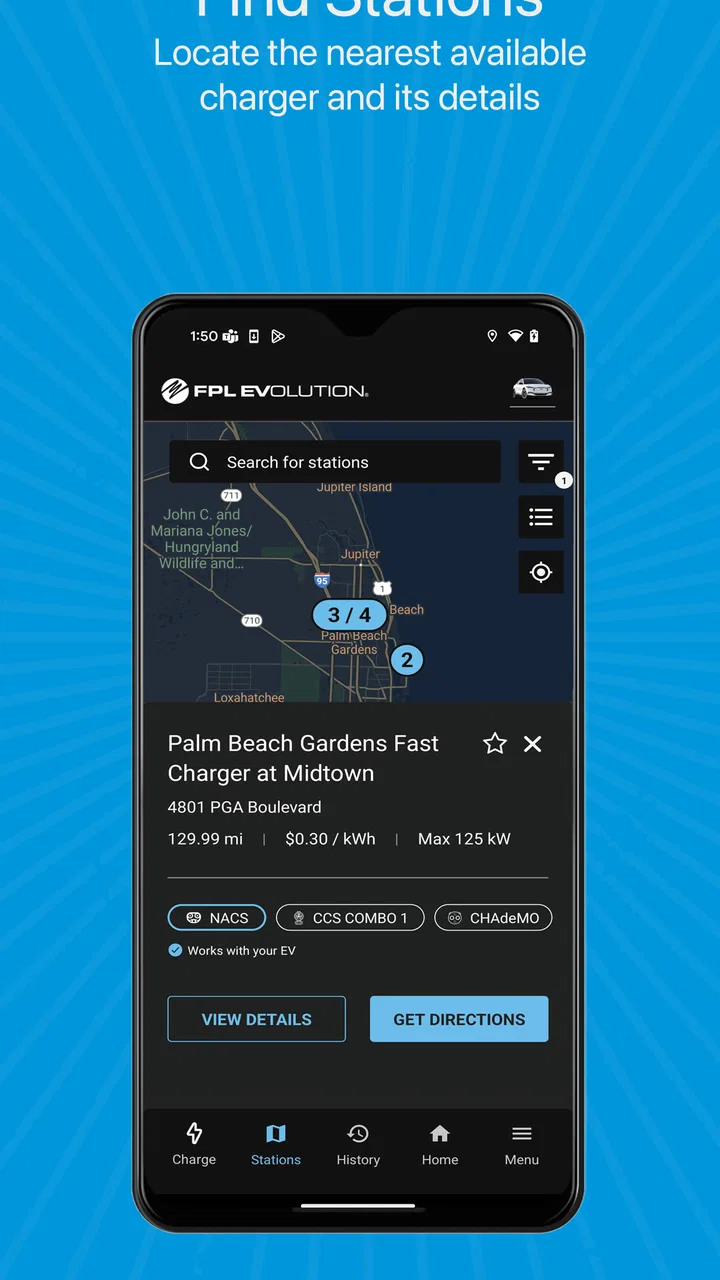
My first practical habit would be to check the charging location before driving toward it. I want to know whether it fits the route, whether the surrounding area is useful while the car charges, and whether the stop makes sense for the time I have available. This is where the app can save more trouble than a last-minute search performed from the driver’s seat.
I would do this planning while parked, ideally before leaving. That small choice has two benefits. First, I can compare the charging stop with the rest of the journey instead of reacting to a warning light. Second, I can hand the plan to another person without needing to explain it while driving. If someone else is taking the car, a clearly chosen destination is easier to communicate than “look for something nearby when the battery gets low.”
A useful, less obvious workflow is to treat the charging stop as part of the destination rather than as an interruption. If I am already heading toward a shopping area, workplace, appointment, or public facility, I can use the app to identify a charging option that supports that stop. The best outcome is not merely finding electricity; it is leaving the car in a sensible place while I complete something I needed to do anyway.
Arriving with a plan instead of improvising
Once I have chosen a location, the app’s value shifts from discovery to execution. I am no longer asking, “Where could I charge?” I am asking, “Is this the stop I intended to use, and can I complete the session without unnecessary confusion?” That handoff between planning and arrival is easy to overlook, but it is where many charging experiences become stressful.
I would keep the app available before reaching the station, while still following safe driving habits and using the vehicle’s navigation or a passenger for route guidance. The phone should not become something I operate in motion. A charging app is a preparation tool first; it should reduce the need to make decisions while driving, not create another screen to manage.
Starting the session and managing the handoff
At the station, the driver’s attention moves from the road to the physical charging setup. This is the point where a digital plan meets a real connector, parking space, and vehicle. I would check that the selected location matches the place I reached, position the car carefully, and then use the app as the control point for the charging interaction where applicable.
This handoff is especially important for families or shared vehicles. The person who planned the stop may not be the person who plugs in. A simple routine helps: identify the station, connect the vehicle, confirm that the session has begun, and tell the next driver what to watch for. That is more reliable than leaving a vague instruction such as “it should be charging.” The app is useful here because it gives the charging task a defined digital home rather than scattering the process across messages, maps, and the car display.
I would also avoid treating the first successful connection as the end of the job. A responsible workflow includes confirming that the vehicle is actually receiving energy and that the session is associated with the intended station. This is one of the concrete advantages of using a dedicated charging application: it encourages me to verify the transition from parked car to active session instead of assuming that plugging in automatically solved everything.
Using charging time deliberately
Charging time is easier to tolerate when it has a purpose. If the stop is near an errand, I can combine the two. If I am traveling with another person, we can decide who stays with the car and who handles the next task. If I am working, I can use the pause as a planned break rather than repeatedly checking the battery without a clear reason.
This is another area where FPL EVolution is more useful as part of a routine than as a one-off emergency download. I can build a repeatable habit around checking a location before departure, arriving with the charger selected, confirming the session, and returning to the vehicle when the stop is complete. The app does not remove every variable in public charging, but it can make my own part of the process more orderly.
Finishing the stop cleanly
The final handoff is from charging back to driving. I would end the session through the expected process, disconnect carefully, and move the vehicle once the charging stop is finished. That last step matters because a charging space is part of a shared system, not a convenient parking place to occupy indefinitely.
For a shared car, I would make the closing routine explicit. The next driver should know whether the vehicle is ready, whether the charging cable has been returned correctly, and whether the app still shows an active session. This is a small but practical insight: charging information is not only for the person who starts a session. It can prevent confusion for whoever takes over afterward.
What the completed workflow gives me
When everything goes smoothly, the result is not simply a fuller battery. The real result is reduced uncertainty. I know why I chose the stop, where it fits into the journey, how the charging action began, and what needs to happen before I leave. That clarity is the strongest reason I would recommend a dedicated app to an EV driver who regularly uses public charging in Florida.
The app’s store summary, “Plug in and energize Florida’s future,” points toward that regional purpose, while its short description, “FPL EVolution,” keeps the focus narrow. In my experience, that narrow focus is more helpful than a general automotive app trying to cover fuel prices, repairs, traffic, insurance, and charging in one crowded interface.
Where the flow can break
No charging application can make the physical world perfectly predictable. A driver can still arrive at a busy location, encounter a connector that does not suit the vehicle, discover that the route has changed, or face a station experience that does not match expectations. I would therefore use FPL EVolution as one part of a backup-minded routine, not as permission to begin a long trip with no alternative plan.
The biggest limitation is the gap between digital confidence and real availability. Seeing a location in an app does not guarantee that the space will be convenient at the exact moment I arrive. That is why I would avoid waiting until the battery is critically low before making the decision. A little planning margin gives me room to change course if the first option is inconvenient.
Another point of friction is that a dedicated regional app may not replace every tool already built into an EV. The vehicle’s navigation can still be better for turn-by-turn driving, while a general map may be more familiar for checking nearby restaurants, stores, or appointments. I would not force FPL EVolution to do all of those jobs. Its strength is the charging-focused part of the workflow; the best setup may involve using it alongside the car’s navigation rather than instead of it.
Drivers who rarely use public charging may also find that installing a dedicated app feels unnecessary. If most journeys begin and end at home and the car’s existing system already handles occasional stops, the extra application may not change daily life much. I would recommend it more strongly to people who travel around Florida, share charging responsibilities, or want a repeatable way to organize public charging.
How it compares with the usual alternatives
The usual alternatives fall into three groups: the car’s built-in navigation, general mapping apps, and broad EV charging platforms. Each has a legitimate advantage. The vehicle system is already present and understands the car’s route. General maps are familiar and useful for planning the rest of a trip. Larger charging platforms may appeal to drivers who travel across many regions and want one broad ecosystem.
FPL EVolution makes the most sense when the driver values a focused Florida charging experience over an all-purpose dashboard. I would choose the built-in system for route guidance, a general map for checking the surrounding businesses, and this app for the charging-specific part of the plan. That division of labor avoids expecting one application to be perfect at everything.
The trade-off is equally clear. A driver who regularly crosses state lines or uses many unrelated charging networks may prefer a broader tool that keeps more destinations together. A driver whose routine is concentrated in Florida may appreciate the smaller scope because it keeps the main task easier to find. The right choice depends less on the app’s category label and more on how often public charging is part of the person’s actual driving life.
Small habits that make it more useful
I would use three habits with this app. First, plan the charging stop before the battery becomes an urgent problem. Second, separate route guidance from charging management so I am not trying to operate everything at once. Third, treat the end of a session as a real step: confirm that charging has stopped as intended, disconnect, and clear the space for the next driver.
A fourth habit is helpful for shared vehicles: agree on a handoff message that includes the chosen charging location and whether the session is complete. This sounds basic, but it removes a common source of uncertainty when one person plans the trip and another person drives the car home. The app becomes part of a communication routine, not just a private screen on one phone.
I would also test the complete process during a low-pressure trip before depending on it during a demanding journey. That gives a new EV owner time to learn where the app fits, how the vehicle and charger interact, and which parts still require the car’s own controls. The goal is not to memorize every screen; it is to know the sequence well enough that a public charging stop feels ordinary.
Who should install it
FPL EVolution is a sensible choice for Florida EV drivers who want a free, focused charging companion and who regularly need to plan stops away from home. It is particularly suitable for someone new to electric driving, because a defined workflow can make public charging feel less mysterious. It also suits households where several people use the same vehicle and need a consistent handoff routine.
I would be more cautious about recommending it to a driver who wants one universal app for every state, every charging provider, and every travel-related task. That person may be happier with a wider platform or with the tools already integrated into the vehicle. Likewise, someone who almost never charges away from home may not gain enough from adding another app to the phone.
My final take on the everyday experience
After looking at the entire journey from planning to departure, I see FPL EVolution as a practical specialist rather than a complete driving command center. Its best contribution is helping me turn public charging into a sequence I can understand: choose a sensible stop, arrive prepared, connect the car, manage the handoff, and leave cleanly when the job is done.
The free price and Everyone age rating make it easy to try, while the 4.2 average indicates a generally positive reception among its users. I would not rely on any charging app without keeping a little flexibility in my route, and I would not replace the vehicle’s navigation or a general map when those tools are better suited to the task. Still, for the Florida EV owner who wants a dedicated charging workflow, this is the kind of focused tool that can earn a regular place on the phone.
My recommendation is straightforward: install it if public charging is a normal part of your driving, test it before an important trip, and use it as the charging specialist within a broader travel routine. Skip it if your needs are mostly home charging or nationwide coverage. For the right driver, FPL EVolution does not need to be flashy; it needs to make the next charging decision easier, and that is where I find its real value.
FAQs for FPL EVolution
01What is FPL EVolution and how does it enhance the FPL experience?
FPL EVolution is a mobile app designed to enhance your Fantasy Premier League (FPL) experience by providing advanced analytics, real-time updates, and team management tools. It offers features like player performance insights, fixture difficulty analysis, and custom notifications to help you make informed decisions and optimize your fantasy team strategy.
02Is FPL EVolution compatible with both Android and iOS devices?
Yes, FPL EVolution is available for both Android and iOS platforms. Users can easily download the app from the respective app stores, ensuring a smooth installation process. The app is optimized to run efficiently on a wide range of devices, providing a seamless user experience regardless of the operating system.
03Does FPL EVolution require a subscription or is it free to use?
FPL EVolution offers a free version with basic features. However, for users seeking enhanced functionalities such as detailed analytics and personalized advice, a premium subscription is available. This subscription unlocks advanced tools designed to give you a competitive edge in managing your fantasy football team.
04How does FPL EVolution ensure data accuracy and reliability?
FPL EVolution sources its data from reliable, official FPL APIs and other verified football statistics databases. The app's algorithms are designed to process and present this data accurately, ensuring users receive trustworthy insights and updates. Regular updates and maintenance further ensure data integrity and app reliability.
05Does FPL EVolution offer customer support in case of technical issues?
Yes, FPL EVolution provides customer support to address any technical issues or inquiries users may have. Support is accessible through the app via email or a help section, where users can find troubleshooting tips and contact options. The support team is dedicated to ensuring a smooth user experience.
Pros
- User-friendly interface for easy navigation.
- Comprehensive player statistics and insights.
- Live score updates keep you informed.
- Customizable team management features.
- Regular updates with new features.
Cons
- In-app ads can be intrusive.
- Requires constant internet connection.
- Limited offline functionalities.
- Occasional bugs affect performance.
- High battery consumption on mobile devices.

FPL EVolution
Gallery